Hashtag Generator – Complete Guide to Creating Effective Social Media Hashtags
Have you ever spent hours on a social media post only to get a handful of likes because nobody saw it? Or maybe you have seen other accounts in your niche grow quickly and wondered what they are doing differently?
I remember starting a photography account on Instagram. I would post beautiful photos, but only my existing followers saw them. I could not figure out why. Then I learned about hashtags. I started adding a few hashtags to my posts, but still nothing. Then I learned the strategy behind hashtags. I started using the right mix of hashtags, and my reach exploded.
Within a month, my posts were getting thousands of views from people who did not follow me. New followers came every day. All because I learned how to use hashtags correctly.
This guide will teach you everything you need to know about hashtags. What they are, how to use them, how many to use, and how to generate effective ones for your content.
Quick access: Use our free hashtag generator here
What is a Hashtag? Simple Answer
A hashtag is a word or phrase preceded by the # symbol. It turns that word into a clickable link that shows all other posts using the same hashtag.
Simple examples:
#travel→ Clicking this shows all posts tagged with travel#food→ Clicking this shows all food-related posts#photography→ Clicking this shows all photography posts
Think of hashtags like file folders. If you put your post in the #travel folder, anyone looking for travel content can find your post.
Why Hashtags Matter
Hashtags are essential for social media growth. Here is why.
For reach and discovery:
- People search for hashtags to find content
- Using relevant hashtags puts your post in front of interested people
- Even people who do not follow you can see your posts
For engagement:
- Posts with hashtags get more likes and comments
- Hashtags help the algorithm understand your content
- The algorithm shows your post to people interested in those topics
For branding:
- Branded hashtags (
#Nike,#Apple) help build community - Campaign hashtags (
#ShareACoke) encourage user-generated content - Event hashtags (
#SXSW2025) bring conversations together
For organization:
- Hashtags categorize your content
- People can follow hashtags (on some platforms)
- Makes your content discoverable long after posting
Types of Hashtags You Need
Effective hashtag strategies use a mix of different hashtag types.
Broad/Niche Hashtags
These describe your content category. They are popular but competitive.
Examples:
#travel,#food,#fashion,#fitness,#photography#digitalmarketing,#webdesign,#socialmedia
When to use: Always. These are your primary hashtags.
Specific/Niche Hashtags
These are more targeted and less competitive. They reach people interested in specific subtopics.
Examples:
#streetphotography(instead of just#photography)#vegandinner(instead of just#food)#morningworkout(instead of just#fitness)
When to use: Always. These often perform better than broad hashtags.
Location Hashtags
These target people in or interested in specific locations.
Examples:
#NYC,#London,#Tokyo#CentralPark,#TimesSquare,#Shibuya
When to use: If your content is location-specific (restaurants, events, travel).
Community Hashtags
These are used by communities around specific interests.
Examples:
#foodblogger,#travelgram,#fitnessmotivation#photographersofinstagram,#womenintech
When to use: When you want to connect with a specific community.
Branded Hashtags
These are unique to your brand or campaign.
Examples:
#JustDoIt(Nike)#ShotOniPhone(Apple)#ShareACoke(Coca-Cola)
When to use: Always for brand building. Encourage followers to use them.
Seasonal/Trending Hashtags
These are popular at specific times or during trends.
Examples:
#SummerVibes,#Christmas2025,#NewYearGoals#BlackFriday,#CyberMonday,#PrimeDay
When to use: When relevant to your content and timely.
Hashtag Strategy by Platform
Each social media platform has different hashtag best practices.
Instagram Hashtags
How many to use: 10-20 hashtags
Where to place: First comment or end of caption
Strategy:
- Mix broad, specific, community, and location hashtags
- Use a mix of popular and less popular hashtags
- Rotate hashtags to avoid being flagged as spam
- Create sets of hashtags for different content types
Instagram hashtag size guide:
| Hashtag popularity | Example | Strategy |
|---|---|---|
| Very popular (50M+ posts) | #love, #instagood |
Use 2-3 |
| Popular (1M-50M posts) | #travelphotography |
Use 5-7 |
| Medium (100K-1M posts) | #streetphotography |
Use 5-7 |
| Small (<100K posts) | #nycstreetphotography |
Use 3-5 |
Instagram hashtag limits:
- Maximum 30 hashtags per post
- Instagram recommends 10-20 for best engagement
- Too few = limited reach
- Too many = looks spammy
TikTok Hashtags
How many to use: 4-6 hashtags
Where to place: In the caption
Strategy:
- Focus on trending hashtags
- Use niche-specific hashtags
- Include
#fypor#foryoupagefor algorithm boost - Use 1-2 broad hashtags
TikTok hashtag tips:
- Trending hashtags change daily. Check the Discover page.
- Smaller niche hashtags often perform better than huge ones.
- Do not overthink it. TikTok's algorithm is good at showing content.
YouTube Hashtags
How many to use: 3-8 hashtags
Where to place: In video title, description, or pinned comment
Strategy:
- Put the most important hashtags first
- Use specific hashtags related to video topic
- Avoid overly popular hashtags (too competitive)
YouTube hashtag tips:
- First 3 hashtags appear above video title
- Too many hashtags can look spammy
- Use hashtags that match your video exactly
Twitter/X Hashtags
How many to use: 1-3 hashtags
Where to place: Within the tweet (not at the end)
Strategy:
- Integrate hashtags naturally into your sentence
- Focus on trending or event hashtags
- Do not use hashtags on every tweet
Twitter hashtag tips:
- 1-2 hashtags perform best
- More than 3 reduces engagement
- Use hashtags that are currently trending
LinkedIn Hashtags
How many to use: 3-5 hashtags
Where to place: End of post
Strategy:
- Use professional, industry-specific hashtags
- Focus on topics, not trends
- Include your company's branded hashtag
LinkedIn hashtag tips:
- Professional tone is important
- Do not use trending hashtags from other platforms
- Hashtags should be relevant to your industry
How to Generate Effective Hashtags
Here is the process I use to generate hashtags for my posts.
Step 1: Identify Your Content Topic
What is your post about? Be specific.
Example: A photo of a latte art in a coffee shop in Seattle.
Topics: coffee, latte art, coffee shop, Seattle
Step 2: Generate Broad Hashtags
Start with broad hashtags related to your topic.
Examples: #coffee, #latteart, #coffeeshop, #seattle
Step 3: Generate Specific Hashtags
Get more specific. Use 2-3 words.
Examples: #specialtycoffee, #latteartoftheday, #seattlecoffee
Step 4: Add Community Hashtags
Use hashtags used by communities you want to reach.
Examples: #coffeeaddict, #baristalife, #coffeelover
Step 5: Add Location Hashtags (If Relevant)
Target people in your area or interested in that location.
Examples: #seattlelife, #visitseattle, #washingtonstate
Step 6: Add Branded Hashtags
Use your own branded hashtags if you have them.
Examples: #YourBrandName
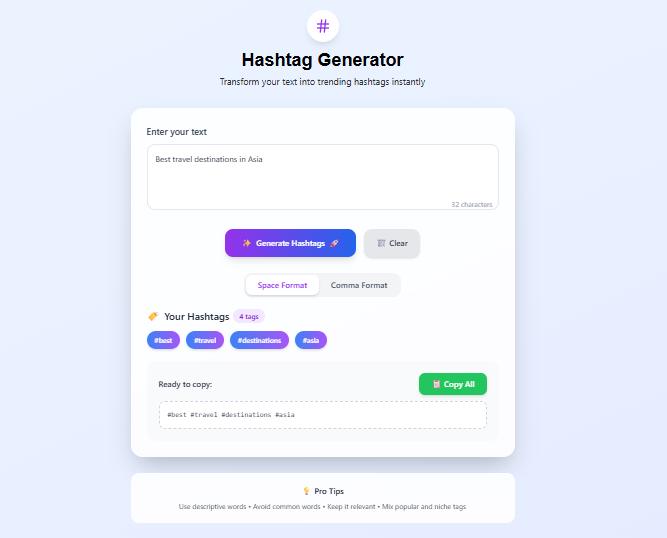
How to Use Our Hashtag Generator
Our hashtag generator makes hashtag creation instant.
Step 1: Enter your text, topic, or caption
Example: "Healthy breakfast ideas for busy mornings"
Step 2: Click "Generate Hashtags"
Step 3: The tool extracts keywords and creates hashtags:
#healthy#breakfast#ideas#busy#mornings
Step 4: Choose your format:
- Space-separated:
#healthy #breakfast #ideas #busy #mornings - Comma-separated:
#healthy, #breakfast, #ideas, #busy, #mornings
Step 5: Copy all hashtags or individual ones
Step 6: Clear and generate new hashtags for different content
The tool automatically removes common stop words (the, and, for, of, etc.) so only meaningful keywords become hashtags.
Hashtag Best Practices
Do's
Do use a mix of hashtag sizes. Combine very popular, moderately popular, and niche hashtags.
Do research your hashtags. Check what hashtags competitors and influencers in your niche use.
Do rotate your hashtags. Using the same set of hashtags on every post can look spammy.
Do create hashtag sets. Create different sets for different content types (e.g., product posts, behind-the-scenes, user-generated content).
Do check hashtag meaning. Some innocent-looking hashtags may have unintended meanings. Search them first.
Don'ts
Don't use banned or broken hashtags. Some hashtags are temporarily or permanently banned. Using them limits your reach.
Don't use irrelevant hashtags. Hashtags must match your content. Using popular but unrelated hashtags annoys users and hurts your account.
Don't use too many hashtags. Each platform has limits. Exceeding them can hide your post or reduce reach.
Don't use hashtags in every word. Not every word needs to be a hashtag. Only hashtag key terms.
Don't use spaces or special characters. Hashtags cannot have spaces or special characters. Use camel case for multiple words: #CoffeeLover not #Coffee Lover.
Hashtag Mistakes to Avoid
Mistake 1: Using the Same Hashtags Every Post
Problem: Instagram and other platforms may flag this as spammy behavior.
Solution: Create multiple hashtag sets and rotate them.
Mistake 2: Using Too Many Popular Hashtags
Problem: Your post gets lost in millions of others using the same hashtag.
Solution: Mix popular hashtags with medium and small ones.
Mistake 3: Using Irrelevant Hashtags
Problem: People click your hashtag expecting one type of content and see something else. They may not engage or could report your post.
Solution: Only use hashtags directly related to your content.
Mistake 4: Not Researching Hashtags
Problem: You might use banned hashtags or hashtags with negative associations.
Solution: Search each hashtag before using it. Check what content appears.
Mistake 5: Putting Hashtags in Comments on Instagram
Problem: Instagram's algorithm may not index hashtags in comments as well as those in captions.
Solution: Put hashtags in the caption. If you must use comments, add them immediately after posting.
Real-Life Hashtag Examples by Niche
Fitness Niche
Broad hashtags: #fitness, #workout, #gym, #training
Specific hashtags: #homeworkout, #legday, #cardio, #weightlifting
Community hashtags: #fitnessmotivation, #fitfam, #gymlife
Location hashtags: #losangelesfitness, #nycgym
Food Niche
Broad hashtags: #food, #foodie, #cooking, #recipe
Specific hashtags: #veganrecipes, #easydinner, #mealprep
Community hashtags: #foodphotography, #instafood, #foodlover
Location hashtags: #chicagofood, #londonrestaurants
Travel Niche
Broad hashtags: #travel, #wanderlust, #adventure, #explore
Specific hashtags: #solotravel, #backpacking, #roadtrip
Community hashtags: #travelgram, #travelphotography, #passionpassport
Location hashtags: #parisfrance, #tokyojapan, #grandcanyon
Photography Niche
Broad hashtags: #photography, #photo, #art, #creative
Specific hashtags: #portraitphotography, #landscapephoto, #streetphotography
Community hashtags: #photographersofinstagram, #photodaily, #picoftheday
Equipment hashtags: #sonyalpha, #canonphotography, #nikon
Marketing Niche
Broad hashtags: #marketing, #digitalmarketing, #socialmedia
Specific hashtags: #contentmarketing, #emailmarketing, #seo
Community hashtags: #marketingtips, #socialmediamanager, #growthhacking
Platform hashtags: #instagrammarketing, #tiktokmarketing
Hashtag Size Guide by Platform
| Platform | Minimum | Recommended | Maximum | Notes |
|---|---|---|---|---|
| 3 | 10-20 | 30 | More hashtags = more reach, but too many looks spammy | |
| TikTok | 2 | 4-6 | 30 | Focus on trending and niche hashtags |
| YouTube | 1 | 3-8 | 15 | First 3 appear above title |
| Twitter/X | 1 | 1-3 | Unlimited | More than 3 reduces engagement |
| 1 | 3-5 | 20 | Professional, industry hashtags | |
| 1 | 1-3 | 30 | Hashtags are less effective on Facebook |
Frequently Asked Questions
Q: How to create hashtags for Instagram?
A: Use our hashtag generator. Enter your topic, generate hashtags, and copy them to your Instagram caption or first comment.
Q: What is the best hashtag generator?
A: Our hashtag generator is free, fast, and works instantly. It turns any text into relevant hashtags.
Q: How many hashtags should I use on Instagram?
A: 10-20 hashtags is the sweet spot. Too few limits reach. Too many looks spammy.
Q: How many hashtags should I use on TikTok?
A: 4-6 hashtags is recommended. Focus on trending and niche hashtags relevant to your content.
Q: How many hashtags should I use on YouTube?
A: 3-8 hashtags. The first 3 appear above your video title, so put your most important ones first.
Q: How many hashtags should I use on Twitter?
A: 1-3 hashtags. More than 3 reduces engagement. Integrate them naturally into your tweet.
Q: How many hashtags should I use on LinkedIn?
A: 3-5 professional, industry-specific hashtags at the end of your post.
Q: What is the difference between broad and specific hashtags?
A: Broad hashtags (#travel) are popular but competitive. Specific hashtags (#solotravelasia) have less competition and reach a more targeted audience.
Q: Can I use the same hashtags on every post?
A: No. Rotating hashtags performs better. Using the same set repeatedly can look spammy to platforms.
Q: What are banned hashtags?
A: Banned hashtags are hashtags that platforms have temporarily or permanently blocked. Using them limits your reach. Research hashtags before using them.
Q: How to find trending hashtags?
A: Check the Explore page on Instagram, Discover page on TikTok, or Trending section on Twitter. Use hashtags relevant to current events or seasons.
Q: Do hashtags work on Facebook?
A: Hashtags are less effective on Facebook than other platforms. Use 1-3 relevant hashtags if you use them at all.
Q: Should I use branded hashtags?
A: Yes. Branded hashtags (#YourBrandName) help build community and encourage user-generated content.
Q: Does the hashtag generator store my data?
A: No. All processing happens in your browser. Your text never leaves your device.
Q: Is the hashtag generator free?
A: Yes. Completely free. No signup. No limits.
My Final Advice
After years of using hashtags across multiple platforms, here is what I have learned.
Use a mix of hashtag sizes. Do not only use popular hashtags with millions of posts. Your post will get lost. Use a mix of popular, medium, and small hashtags.
Research your hashtags. Before using a hashtag, search it. Make sure it is relevant and not banned. Check what content appears under that hashtag.
Rotate your hashtags. Create 3-5 different hashtag sets for different content types. Rotate them to avoid looking spammy.
Keep hashtags relevant. Do not use popular but unrelated hashtags. It annoys users and hurts your account.
Follow hashtag size limits. Each platform has recommended limits. Following them maximizes your reach.
Create branded hashtags. Encourage your followers to use them. They build community and generate user content.
Use a hashtag generator. Manually creating hashtags for every post takes time. Our tool does it instantly.
And finally, do not obsess over hashtags. They are important, but content quality matters more. A great post with decent hashtags outperforms a mediocre post with perfect hashtags.
Generate Hashtags Now – Free Tool
Have questions about hashtag strategy for your specific niche? Leave a comment below. I try to answer every one.
Tags: hashtag generator, how to create hashtags, instagram hashtags, tiktok hashtag generator, youtube hashtag tool, social media hashtags, ai hashtag maker, trending hashtags, hashtag strategy, best hashtags for instagram, best hashtags for tiktok, best hashtags for youtube, best hashtags for twitter, hashtag best practices, how many hashtags to use, hashtag size guide, hashtag placement guide, branded hashtags, community hashtags, content hashtags, location hashtags, niche hashtags, viral hashtags, hashtag for reach, hashtag for engagement, hashtag for followers, hashtag generator online free, text to hashtag converter, keyword to hashtag converter, hashtag for social media growth