How to Use a Scientific Calculator – Trigonometry, Logarithms & Memory Functions Guide
Have you ever looked at a scientific calculator and felt overwhelmed by all the buttons? Or maybe you needed to calculate sin(30) but did not know whether to use degrees or radians?
I remember my first physics class in college. The professor asked us to calculate the sine of 45 degrees. I confidently typed sin(45) into my calculator and got 0.85. Everyone else got 0.707. I had no idea why my answer was different. After class, a friend explained that my calculator was in radian mode, not degree mode. That small mistake taught me an important lesson about scientific calculators.
Since then, I have used scientific calculators for thousands of calculations across physics, engineering, and finance. This guide will show you everything I have learned about using a scientific calculator effectively. No confusing jargon. Just practical explanations and real examples.
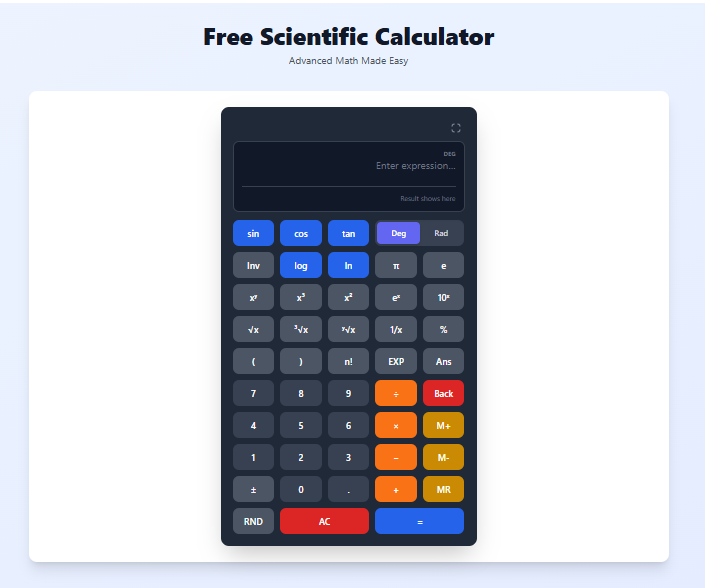
Quick access: Use our free scientific calculator here
What is a Scientific Calculator? Simple Answer
A scientific calculator is a calculator that can do more than just basic arithmetic. While a regular calculator handles addition, subtraction, multiplication, and division, a scientific calculator adds functions like:
- Trigonometric functions (sin, cos, tan)
- Logarithms (log, ln)
- Exponentials (powers and roots)
- Memory storage
- Angle modes (degrees and radians)
Think of it like this. A regular calculator is like a bicycle. It gets you where you need to go but only on simple roads. A scientific calculator is like a car. It handles everything the bicycle can do, plus highways, hills, and long distances.
When Do You Need a Scientific Calculator?
I use a scientific calculator in many situations.
For students:
- High school math (algebra, geometry, trigonometry)
- Physics problems (force, motion, waves)
- Chemistry calculations (pH, logarithms)
- Calculus homework (limits, derivatives)
For professionals:
- Engineers (stress calculations, signal processing)
- Architects (angles, structural loads)
- Financial analysts (exponential growth, compound interest)
- Data scientists (logarithmic transformations)
For everyday use:
- DIY projects involving angles
- Cooking with exponential scaling
- Understanding interest rates
- Helping kids with math homework
Regular Calculator vs Scientific Calculator – What is the Difference?
Here is a simple comparison based on my experience.
| Feature | Regular Calculator | Scientific Calculator |
|---|---|---|
| Addition, subtraction, multiplication, division | Yes | Yes |
| Percentages | Yes | Yes |
| Square roots | Some | Yes |
| Trigonometric functions (sin, cos, tan) | No | Yes |
| Logarithms (log, ln) | No | Yes |
| Exponents and powers | Basic | Advanced |
| Memory functions | Limited | Full (store, recall, add, subtract) |
| Angle modes (degrees vs radians) | No | Yes |
| Inverse trigonometric functions | No | Yes |
If you only need to calculate bills or split restaurant checks, a regular calculator is fine. If you are taking a math or science class, you need a scientific calculator.
Trigonometry Table (sin, cos, tan, cosec, sec, cot)
Here is a complete trigonometry table for common angles. Keep this handy when solving problems.
Basic Trigonometric Values Table
| Angle (θ) | sin θ | cos θ | tan θ | cosec θ | sec θ | cot θ |
|---|---|---|---|---|---|---|
| 0° | 0 | 1 | 0 | ∞ | 1 | ∞ |
| 30° | 1/2 = 0.5 | √3/2 = 0.866 | 1/√3 = 0.577 | 2 | 2/√3 = 1.155 | √3 = 1.732 |
| 45° | 1/√2 = 0.707 | 1/√2 = 0.707 | 1 | √2 = 1.414 | √2 = 1.414 | 1 |
| 60° | √3/2 = 0.866 | 1/2 = 0.5 | √3 = 1.732 | 2/√3 = 1.155 | 2 | 1/√3 = 0.577 |
| 90° | 1 | 0 | ∞ | 1 | ∞ | 0 |
| 120° | √3/2 = 0.866 | -1/2 = -0.5 | -√3 = -1.732 | 2/√3 = 1.155 | -2 | -1/√3 = -0.577 |
| 135° | 1/√2 = 0.707 | -1/√2 = -0.707 | -1 | √2 = 1.414 | -√2 = -1.414 | -1 |
| 150° | 1/2 = 0.5 | -√3/2 = -0.866 | -1/√3 = -0.577 | 2 | -2/√3 = -1.155 | -√3 = -1.732 |
| 180° | 0 | -1 | 0 | ∞ | -1 | ∞ |
| 210° | -1/2 = -0.5 | -√3/2 = -0.866 | 1/√3 = 0.577 | -2 | -2/√3 = -1.155 | √3 = 1.732 |
| 225° | -1/√2 = -0.707 | -1/√2 = -0.707 | 1 | -√2 = -1.414 | -√2 = -1.414 | 1 |
| 240° | -√3/2 = -0.866 | -1/2 = -0.5 | √3 = 1.732 | -2/√3 = -1.155 | -2 | 1/√3 = 0.577 |
| 270° | -1 | 0 | ∞ | -1 | ∞ | 0 |
| 300° | -√3/2 = -0.866 | 1/2 = 0.5 | -√3 = -1.732 | -2/√3 = -1.155 | 2 | -1/√3 = -0.577 |
| 315° | -1/√2 = -0.707 | 1/√2 = 0.707 | -1 | -√2 = -1.414 | √2 = 1.414 | -1 |
| 330° | -1/2 = -0.5 | √3/2 = 0.866 | -1/√3 = -0.577 | -2 | 2/√3 = 1.155 | -√3 = -1.732 |
| 360° | 0 | 1 | 0 | ∞ | 1 | ∞ |
Quick Memory Tricks for Trigonometry Table
For sin θ (0°, 30°, 45°, 60°, 90°):
- Write numbers 0, 1, 2, 3, 4
- Divide each by 4
- Take square root
- Result: 0, 1/2, 1/√2, √3/2, 1
For cos θ (same angles in reverse order):
- 90°: 0
- 60°: 1/2
- 45°: 1/√2
- 30°: √3/2
- 0°: 1
For tan θ:
- tan θ = sin θ / cos θ
- tan 0° = 0
- tan 30° = 1/√3 ≈ 0.577
- tan 45° = 1
- tan 60° = √3 ≈ 1.732
- tan 90° = undefined (∞)
Trigonometric Identities Table (Useful for Problem Solving)
These identities help simplify complex trigonometric expressions.
Basic Identities
| Identity | Formula |
|---|---|
| Pythagorean Identity | sin²θ + cos²θ = 1 |
| Pythagorean Identity | 1 + tan²θ = sec²θ |
| Pythagorean Identity | 1 + cot²θ = cosec²θ |
| Reciprocal Identity | sin θ = 1/cosec θ |
| Reciprocal Identity | cos θ = 1/sec θ |
| Reciprocal Identity | tan θ = 1/cot θ |
| Quotient Identity | tan θ = sin θ / cos θ |
| Quotient Identity | cot θ = cos θ / sin θ |
Negative Angle Identities
| Identity | Formula |
|---|---|
| sin(-θ) = -sin θ | |
| cos(-θ) = cos θ | |
| tan(-θ) = -tan θ |
Complementary Angle Identities (θ and 90°-θ)
| Identity | Formula |
|---|---|
| sin(90°-θ) = cos θ | |
| cos(90°-θ) = sin θ | |
| tan(90°-θ) = cot θ | |
| cot(90°-θ) = tan θ | |
| sec(90°-θ) = cosec θ | |
| cosec(90°-θ) = sec θ |
Supplementary Angle Identities (θ and 180°-θ)
| Identity | Formula |
|---|---|
| sin(180°-θ) = sin θ | |
| cos(180°-θ) = -cos θ | |
| tan(180°-θ) = -tan θ |
Double Angle Formulas
| Identity | Formula |
|---|---|
| sin(2θ) = 2 sin θ cos θ | |
| cos(2θ) = cos²θ - sin²θ = 2cos²θ - 1 = 1 - 2sin²θ | |
| tan(2θ) = 2 tan θ / (1 - tan²θ) |
Logarithm Table (Common Logarithms - Base 10)
Before calculators, people used logarithm tables for complex calculations. Here is a reference table for common logarithms.
How to Read This Table
log₁₀(2) = 0.3010 means 10⁰·³⁰¹⁰ = 2
| Number (x) | log₁₀(x) | Number (x) | log₁₀(x) |
|---|---|---|---|
| 1 | 0.0000 | 10 | 1.0000 |
| 2 | 0.3010 | 20 | 1.3010 |
| 3 | 0.4771 | 30 | 1.4771 |
| 4 | 0.6021 | 40 | 1.6021 |
| 5 | 0.6990 | 50 | 1.6990 |
| 6 | 0.7782 | 60 | 1.7782 |
| 7 | 0.8451 | 70 | 1.8451 |
| 8 | 0.9031 | 80 | 1.9031 |
| 9 | 0.9542 | 90 | 1.9542 |
| 10 | 1.0000 | 100 | 2.0000 |
Logarithms of Fractions
| Fraction | Decimal | log₁₀(x) |
|---|---|---|
| 1/2 = 0.5 | 0.5 | -0.3010 |
| 1/3 ≈ 0.333 | 0.333 | -0.4771 |
| 1/4 = 0.25 | 0.25 | -0.6021 |
| 1/5 = 0.2 | 0.2 | -0.6990 |
| 1/8 = 0.125 | 0.125 | -0.9031 |
| 1/10 = 0.1 | 0.1 | -1.0000 |
Natural Logarithm Table (ln - Base e)
Natural logarithms use base e (approximately 2.71828).
| Number (x) | ln(x) | Number (x) | ln(x) |
|---|---|---|---|
| 1 | 0.0000 | 10 | 2.3026 |
| 2 | 0.6931 | 20 | 2.9957 |
| 3 | 1.0986 | 30 | 3.4012 |
| 4 | 1.3863 | 40 | 3.6889 |
| 5 | 1.6094 | 50 | 3.9120 |
| 6 | 1.7918 | 60 | 4.0943 |
| 7 | 1.9459 | 70 | 4.2485 |
| 8 | 2.0794 | 80 | 4.3820 |
| 9 | 2.1972 | 90 | 4.4998 |
| 10 | 2.3026 | 100 | 4.6052 |
Important Natural Log Values
| Value | ln(x) | Explanation |
|---|---|---|
| ln(e) | 1 | e¹ = e |
| ln(e²) | 2 | e² = 7.389 |
| ln(1) | 0 | e⁰ = 1 |
| ln(1/e) | -1 | e⁻¹ = 0.3679 |
Exponential (e^x) Table
Exponential functions are the inverse of natural logarithms.
| x | e^x | x | e^x |
|---|---|---|---|
| 0 | 1.0000 | 5 | 148.413 |
| 0.5 | 1.6487 | 6 | 403.429 |
| 1 | 2.7183 | 7 | 1096.63 |
| 1.5 | 4.4817 | 8 | 2980.96 |
| 2 | 7.3891 | 9 | 8103.08 |
| 2.5 | 12.182 | 10 | 22026.5 |
| 3 | 20.0855 | -1 | 0.3679 |
| 4 | 54.5982 | -2 | 0.1353 |
Square Root and Cube Root Table
| Number | √x | ∛x | Number | √x | ∛x |
|---|---|---|---|---|---|
| 1 | 1.000 | 1.000 | 20 | 4.472 | 2.714 |
| 2 | 1.414 | 1.260 | 25 | 5.000 | 2.924 |
| 3 | 1.732 | 1.442 | 30 | 5.477 | 3.107 |
| 4 | 2.000 | 1.587 | 36 | 6.000 | 3.302 |
| 5 | 2.236 | 1.710 | 40 | 6.325 | 3.420 |
| 6 | 2.449 | 1.817 | 49 | 7.000 | 3.659 |
| 7 | 2.646 | 1.913 | 50 | 7.071 | 3.684 |
| 8 | 2.828 | 2.000 | 64 | 8.000 | 4.000 |
| 9 | 3.000 | 2.080 | 81 | 9.000 | 4.327 |
| 10 | 3.162 | 2.154 | 100 | 10.000 | 4.642 |
| 11 | 3.317 | 2.224 | 121 | 11.000 | 4.946 |
| 12 | 3.464 | 2.289 | 125 | 11.180 | 5.000 |
| 13 | 3.606 | 2.351 | 144 | 12.000 | 5.241 |
| 14 | 3.742 | 2.410 | 169 | 13.000 | 5.529 |
| 15 | 3.873 | 2.466 | 196 | 14.000 | 5.809 |
| 16 | 4.000 | 2.520 | 225 | 15.000 | 6.082 |
| 17 | 4.123 | 2.571 | 256 | 16.000 | 6.350 |
| 18 | 4.243 | 2.621 | 289 | 17.000 | 6.611 |
| 19 | 4.359 | 2.668 | 324 | 18.000 | 6.868 |
Powers of 2, 3, 5, 10 Table
Useful for computer science, exponential growth, and quick calculations.
| n | 2^n | 3^n | 5^n | 10^n |
|---|---|---|---|---|
| 0 | 1 | 1 | 1 | 1 |
| 1 | 2 | 3 | 5 | 10 |
| 2 | 4 | 9 | 25 | 100 |
| 3 | 8 | 27 | 125 | 1,000 |
| 4 | 16 | 81 | 625 | 10,000 |
| 5 | 32 | 243 | 3,125 | 100,000 |
| 6 | 64 | 729 | 15,625 | 1,000,000 |
| 7 | 128 | 2,187 | 78,125 | 10,000,000 |
| 8 | 256 | 6,561 | 390,625 | 100,000,000 |
| 9 | 512 | 19,683 | 1,953,125 | 1,000,000,000 |
| 10 | 1,024 | 59,049 | 9,765,625 | 10,000,000,000 |
Common Constants Table
| Constant | Symbol | Value | Used In |
|---|---|---|---|
| Pi | π | 3.14159265359 | Circles, trigonometry, waves |
| Pi/2 | π/2 | 1.57079632679 | Right angles in radians |
| Pi/3 | π/3 | 1.0471975512 | 60 degrees in radians |
| Pi/4 | π/4 | 0.78539816339 | 45 degrees in radians |
| Pi/6 | π/6 | 0.5235987756 | 30 degrees in radians |
| Euler's number | e | 2.71828182846 | Natural logarithms, growth |
| Square root of 2 | √2 | 1.41421356237 | Geometry, Pythagorean theorem |
| Square root of 3 | √3 | 1.73205080757 | 30-60-90 triangles |
| Square root of 5 | √5 | 2.2360679775 | Golden ratio |
| Golden ratio | φ (phi) | 1.61803398875 | Art, nature, finance |
Degree to Radian Conversion Table
| Degrees | Radians (exact) | Radians (decimal) |
|---|---|---|
| 0° | 0 | 0 |
| 15° | π/12 | 0.2618 |
| 30° | π/6 | 0.5236 |
| 45° | π/4 | 0.7854 |
| 60° | π/3 | 1.0472 |
| 75° | 5π/12 | 1.3090 |
| 90° | π/2 | 1.5708 |
| 105° | 7π/12 | 1.8326 |
| 120° | 2π/3 | 2.0944 |
| 135° | 3π/4 | 2.3562 |
| 150° | 5π/6 | 2.6180 |
| 165° | 11π/12 | 2.8798 |
| 180° | π | 3.1416 |
| 270° | 3π/2 | 4.7124 |
| 360° | 2π | 6.2832 |
Conversion formulas:
- Radians = Degrees × (π/180)
- Degrees = Radians × (180/π)
How to Use a Scientific Calculator – Basic Operations
Before getting into advanced functions, let me explain the basic layout.
The Display
The screen shows your input and the result. Most scientific calculators can show long expressions, not just the final number.
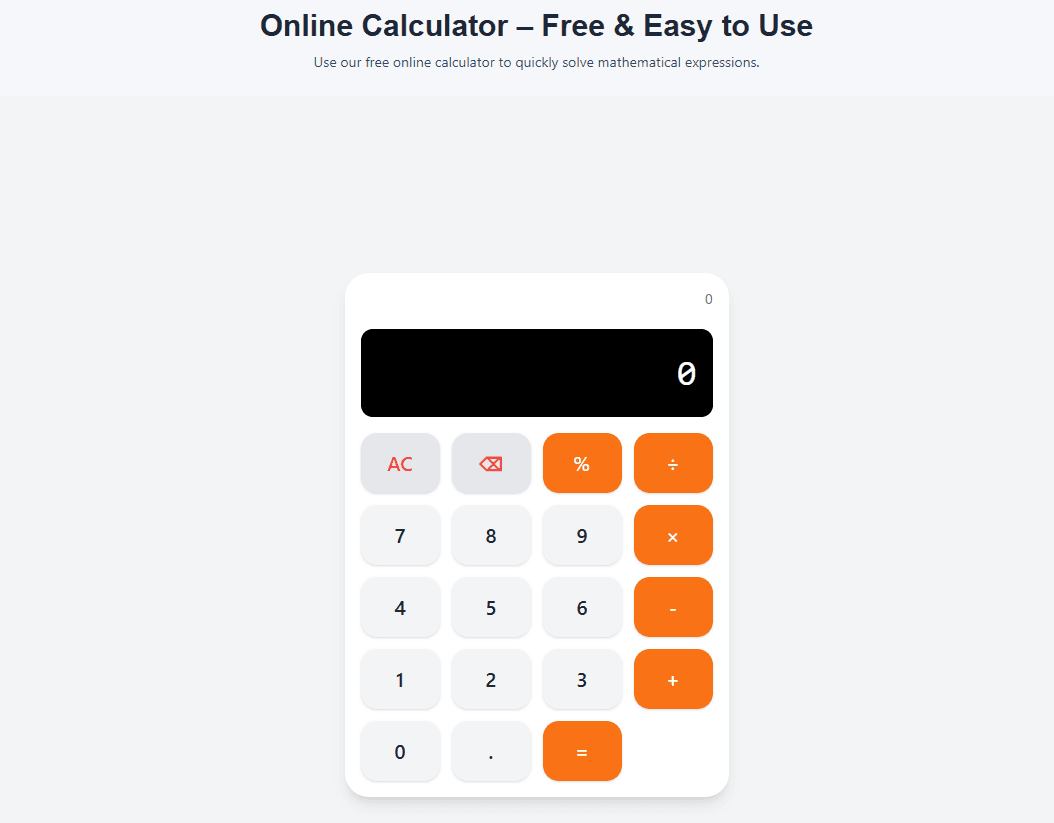
Number and Operator Buttons
These work like any calculator.
- 0-9: Enter numbers
- + - × ÷: Basic operations
- =: Calculate result
- AC or C: Clear everything
- ⌫ or DEL: Delete last character
Parentheses
Use parentheses to control the order of operations. Without parentheses, the calculator follows standard math rules (multiplication and division before addition and subtraction).
Example:
- Without parentheses: 2 + 3 × 4 = 14 (multiplies first)
- With parentheses: (2 + 3) × 4 = 20 (adds first)
How to Use Trigonometric Functions (sin, cos, tan)
Trigonometric functions are used for angles in triangles, waves, circles, and many real-world problems.
The Most Important Setting: Degrees vs Radians
This is the setting that confused me in my first physics class.
Degrees (DEG):
- A full circle is 360 degrees
- Right angle is 90 degrees
- Most common in geometry and everyday angles
Radians (RAD):
- A full circle is 2π radians (about 6.283)
- Right angle is π/2 radians (about 1.571)
- Used in calculus, physics, and advanced math
How to know which mode to use:
- If the angle has a degree symbol (30°), use DEG mode
- If the angle is written as a fraction of π (π/6), use RAD mode
- If the angle is just a number (0.5), check the problem context
How to Calculate sin, cos, tan
Example 1: sin(30°) in DEG mode
- Make sure calculator shows DEG (not RAD)
- Press sin
- Type 30
- Press =
- Result: 0.5
Example 2: cos(60°) in DEG mode
- Press cos
- Type 60
- Press =
- Result: 0.5
Example 3: tan(45°) in DEG mode
- Press tan
- Type 45
- Press =
- Result: 1
How to Calculate Inverse Trigonometric Functions (asin, acos, atan)
Inverse functions tell you what angle gives a certain value.
Example: What angle has sin = 0.5?
- Press asin or sin⁻¹ (might need to press shift or 2nd first)
- Type 0.5
- Press =
- Result: 30° (in DEG mode) or 0.524 rad (in RAD mode)
Real Example Using Trigonometry
Problem: You have a 5-meter ladder leaning against a wall. The ladder makes a 60° angle with the ground. How high up the wall does the ladder reach?
Solution: Height = ladder length × sin(angle) = 5 × sin(60°)
- Set calculator to DEG mode
- From the trigonometry table, sin(60°) = 0.866
- Multiply by 5 = 4.33 meters
Answer: The ladder reaches 4.33 meters up the wall.
How to Use Logarithms (log and ln)
Logarithms are the opposite of exponents. They answer the question: "What power do I need to raise a number to get this value?"
Common Logarithm (log) – Base 10
log(100) asks: "What power of 10 equals 100?" The answer is 2 because 10² = 100.
How to calculate:
- Press log
- Type the number
- Press =
Examples:
- log(100) = 2 (because 10² = 100)
- log(1000) = 3 (because 10³ = 1000)
- log(50) ≈ 1.699 (from logarithm table)
Natural Logarithm (ln) – Base e
ln(x) asks: "What power of e (about 2.718) equals x?"
How to calculate:
- Press ln
- Type the number
- Press =
Examples:
- ln(e) = 1 (because e¹ = e)
- ln(1) = 0 (because e⁰ = 1)
- ln(10) ≈ 2.303 (from natural log table)
Real Example Using Logarithms
Problem: The pH of a solution is calculated as pH = -log[H⁺]. If the hydrogen ion concentration [H⁺] is 0.0001 M, what is the pH?
Solution: pH = -log(0.0001)
- 0.0001 = 10⁻⁴
- log(10⁻⁴) = -4
- pH = -(-4) = 4
Answer: The pH is 4 (acidic).
How to Use Exponential and Power Functions
Square Root (√)
How to calculate:
- Press √
- Type the number
- Press =
Examples:
- √16 = 4
- √2 ≈ 1.414 (from square root table)
- √100 = 10
Powers (x^y)
To calculate 2³ (2 to the power of 3 = 8):
- Type 2
- Press x^y or ^ button
- Type 3
- Press =
Examples:
- 2^10 = 1024 (from powers table)
- 5^3 = 125
- 10^6 = 1,000,000
Exponentials (e^x)
e^x calculates e raised to the power x. e is approximately 2.718.
How to calculate e²:
- Press e^x or exp button
- Type 2
- Press =
- Result ≈ 7.389 (from exponential table)
Real Example Using Powers
Problem: You invest $1000 at 5% annual interest, compounded annually. How much money do you have after 10 years?
Formula: A = P × (1 + r)^t = 1000 × (1.05)^10
- Calculate 1.05^10
- From powers table reference: 1.05^10 ≈ 1.629
- Multiply by 1000 = 1629
Answer: You have $1629 after 10 years.
How to Use Memory Functions
Memory functions help when you have multi-step problems. Instead of writing down intermediate results, you store them in the calculator's memory.
Memory Functions Explained
| Button | Meaning | What It Does |
|---|---|---|
| MC | Memory Clear | Clears stored value (sets to zero) |
| MR | Memory Recall | Shows stored value |
| M+ | Memory Add | Adds current result to stored value |
| M- | Memory Subtract | Subtracts current result from stored value |
How to Use Memory – A Real Example
Problem: Calculate (15 × 4) + (20 × 3)
Without memory:
- Calculate 15 × 4 = 60
- Write down 60
- Calculate 20 × 3 = 60
- Add 60 + 60 = 120
With memory:
- Calculate 15 × 4 = 60
- Press M+ (stores 60 in memory)
- Calculate 20 × 3 = 60
- Press M+ (adds 60 to memory, now memory = 120)
- Press MR to recall 120
Answer: 120
Memory functions save time when you have long calculations with multiple parts.
How to Switch Between Degrees and Radians
This is the most common source of wrong answers on scientific calculators. I learned this lesson the hard way.
How to check which mode you are in:
- Look at the display. It will show DEG or RAD.
How to switch modes:
- Look for a DRG button (Degrees, Radians, Gradians)
- Or use our calculator which has a clear DEG/RAD toggle
Why mode matters:
| Angle | DEG Mode | RAD Mode |
|---|---|---|
| sin(30) | 0.5 | -0.988 (very wrong for 30 degrees) |
| sin(1) | 0.0175 | 0.8415 |
If you calculate sin(30) expecting 0.5 but get -0.988, you are in RAD mode. Switch to DEG.
My rule: For geometry problems, use DEG. For calculus and physics problems, check what the problem uses. If angles are written with π, use RAD.
Common Scientific Calculator Mistakes and How to Avoid Them
Mistake 1: Wrong Angle Mode
Problem: Calculating sin(30) but getting -0.988 instead of 0.5
Solution: Check if calculator is in DEG mode. Switch to DEG for degrees.
Mistake 2: Order of Operations Errors
Problem: Calculating 2 + 3 × 4 but expecting 20
Solution: Use parentheses. Type (2 + 3) × 4 to add first.
Mistake 3: Forgetting to Clear Memory
Problem: Getting unexpected results because old value is still in memory
Solution: Press MC to clear memory before starting a new problem.
Mistake 4: Using log Instead of ln
Problem: Calculating ln(10) but using log button
Solution: Remember log is base 10, ln is base e. They give different results.
Mistake 5: Not Using Parentheses for Fractions
Problem: Calculating 1/2+3 but expecting 1/(2+3)
Solution: Type 1 ÷ (2 + 3) to add denominator first.
Real Examples of Scientific Calculator Use
Example 1: Physics – Projectile Motion
Problem: A ball is thrown at 20 m/s at a 30° angle. What is the vertical velocity component?
Formula: Vertical velocity = velocity × sin(angle) = 20 × sin(30°)
Steps:
- Set to DEG mode
- From trigonometry table, sin(30°) = 0.5
- 20 × 0.5 = 10
Answer: 10 m/s upward
Example 2: Chemistry – pH Calculation
Problem: What is the pH of a solution with [H⁺] = 3.2 × 10⁻⁵ M?
Formula: pH = -log[H⁺] = -log(3.2 × 10⁻⁵)
Steps:
- log(3.2 × 10⁻⁵) = log(3.2) + log(10⁻⁵)
- From logarithm table, log(3.2) ≈ 0.5051
- log(10⁻⁵) = -5
- Sum = 0.5051 - 5 = -4.4949
- pH = -(-4.4949) = 4.495
Answer: pH = 4.50 (rounded)
Example 3: Finance – Compound Interest
Problem: You invest $5000 at 6% annual interest compounded monthly for 3 years. What is the final amount?
Formula: A = P × (1 + r/n)^(n×t) = 5000 × (1 + 0.06/12)^(12×3)
Steps:
- Calculate r/n = 0.06/12 = 0.005
- Calculate 1 + 0.005 = 1.005
- Calculate exponent n×t = 12×3 = 36
- Calculate 1.005^36 = 1.1967
- Multiply by 5000 = 5983.50
Answer: $5983.50
Example 4: Trigonometry – Finding an Angle
Problem: A 10-foot ladder reaches 8 feet up a wall. What angle does it make with the ground?
Formula: sin(angle) = opposite/hypotenuse = 8/10 = 0.8 angle = arcsin(0.8)
Steps:
- Set to DEG mode
- Press asin or sin⁻¹
- Type 0.8
- Press =
- Result: 53.13 degrees
Answer: 53.13 degrees
Online Scientific Calculator vs Physical Scientific Calculator
After using both types extensively, here are my thoughts.
Advantages of Online Scientific Calculator
- Always available (no batteries needed)
- Free (no purchase required)
- Keyboard support (type faster than pressing buttons)
- Larger display (easier to read)
- No learning curve for different models
Advantages of Physical Scientific Calculator
- Allowed in exams (most online calculators are not)
- Works offline
- Physical buttons (some people prefer tactile feedback)
- No screen glare issues
My Recommendation
Use an online scientific calculator for studying, homework, and everyday calculations. It is free, fast, and always available. Use a physical calculator for exams (check your school's policy first).
Frequently Asked Questions
Q: How to use a scientific calculator for trigonometry?
A: First, check if you are in DEG or RAD mode. Then press the function button (sin, cos, tan), enter the angle, and press equals. For example, sin(30) in DEG mode equals 0.5.
Q: What is the difference between DEG and RAD on a scientific calculator?
A: DEG measures angles in degrees (0 to 360). RAD measures angles in radians (0 to 2π). Use DEG for geometry and everyday angles. Use RAD for calculus and advanced physics.
Q: How to calculate log on a scientific calculator?
A: Press the log button (base 10) or ln button (base e). Then enter the number. For example, log(100) = 2, ln(10) ≈ 2.303.
Q: How to calculate sin on a scientific calculator?
A: Make sure the angle mode is correct (DEG or RAD). Press sin, enter the angle, press equals. For sin(30°) in DEG mode, you get 0.5.
Q: What is the best free online scientific calculator?
A: Our scientific calculator is completely free, has all standard functions, and works on any device.
Q: How to switch between degrees and radians?
A: Look for a DRG button or a DEG/RAD toggle. On our calculator, just click the DEG/RAD button to switch modes.
Q: How to calculate power (x^y) on a scientific calculator?
A: Enter the base number, press the x^y or ^ button, enter the exponent, press equals. For example, 2^3 = 8.
Q: How to calculate square root on a scientific calculator?
A: Press the √ button, enter the number, press equals. For example, √16 = 4.
Q: What are memory functions (MC, MR, M+, M-) on a scientific calculator?
A: MC clears memory. MR recalls stored value. M+ adds current value to memory. M- subtracts current value from memory. Use them for multi-step calculations.
Q: Can I use a scientific calculator for calculus?
A: Yes. Scientific calculators handle the basic calculations needed for calculus (trigonometry, logarithms, exponentials). But they do not do symbolic calculus (derivatives or integrals automatically).
Q: Is a scientific calculator allowed on exams?
A: Check with your school or exam board. Many exams allow basic scientific calculators but prohibit graphing calculators or internet-connected devices.
Q: How to calculate inverse trigonometric functions?
A: Press asin, acos, or atan button (sometimes labeled sin⁻¹, cos⁻¹, tan⁻¹). Enter the value. Press equals. The calculator shows the angle.
Q: Does the scientific calculator work on mobile?
A: Yes. Our scientific calculator works on phones, tablets, and computers.
Q: Can I use keyboard shortcuts with the online scientific calculator?
A: Yes. You can type numbers and operators directly from your keyboard.
Q: Is the scientific calculator free?
A: Yes. Completely free. No signup. No limits.
My Final Advice
After using scientific calculators for years in school, work, and personal projects, here is what I have learned.
Always check your angle mode. Most wrong answers come from being in RAD mode when you need DEG, or vice versa. Get in the habit of checking before every trigonometric calculation.
Use the reference tables. Keep the trigonometry table, logarithm table, and other tables handy. They save time and help you verify your calculator results.
Use parentheses. They make your intentions clear and prevent order of operations mistakes. When in doubt, add parentheses.
Learn memory functions. They save time on long calculations. Storing intermediate results is faster than writing them down and re-typing.
Practice with simple problems first. Before tackling a complex calculation, test your calculator on problems you already know the answer to. This confirms you are using the right settings.
Do not be afraid to experiment. The best way to learn is by trying. Enter different functions, see what happens. You cannot break the calculator.
And finally, use a good scientific calculator. Our tool has all the functions you need, works instantly, and is completely free.
Try Our Free Scientific Calculator Now
Have questions about using a scientific calculator for a specific problem? Leave a comment below. I try to answer every one.
Tags: scientific calculator online, how to use scientific calculator, free scientific calculator, scientific calculator with trigonometry, online scientific calculator with deg rad, scientific calculator with logarithms, scientific calculator with memory functions, advanced math calculator online, trigonometric calculator online, logarithm calculator online, exponential calculator online, power calculator online, square root calculator, scientific calculator for students, scientific calculator for engineers, scientific calculator for physics, sin cos tan calculator online, inverse trigonometric functions calculator, natural log calculator, log base 10 calculator, scientific calculator vs regular calculator, how to calculate sin on scientific calculator, how to calculate log on scientific calculator, how to switch between degrees and radians, scientific calculator memory functions explained, online calculator with keyboard support, scientific calculator free no download, trigonometry table, sin cos tan table, logarithm table, common logarithm table, natural logarithm table, square root table, cube root table, trigonometric identities table, math reference tables