How to Calculate Date Difference with Business Days – Complete Guide with Working Days Calculator
Have you ever tried to calculate how many actual working days are between two dates for a project deadline? Or maybe you needed to exclude weekends from a delivery estimate and kept getting confused about whether to count the end date or not?
I remember planning a 60-day project for a client. I simply counted 60 calendar days from the start date. But when I presented the timeline, I realized that weekends were included in my calculation. The client expected 60 working days, not 60 total days. That meant my timeline was off by nearly 3 weeks. I had to redo the entire project schedule.
That experience taught me something important. Not all days are equal. A business day is different from a calendar day. Weekends matter. Holidays matter even more.
After helping hundreds of project managers, event planners, and business owners calculate accurate timelines, I created this guide. No more confusion. No more missed deadlines. Just clear methods and a tool that does all the math for you.
Quick access: Use our free business days & date difference calculator here
What is a Business Days Calculator? Simple Answer
A business days calculator (also called a working days calculator) tells you exactly how many weekdays fall between two dates. It can exclude Saturdays, Sundays, or both depending on your work week.
But a good date difference calculator does much more:
- Total calendar days between dates
- Number of working days (Monday to Friday or Monday to Saturday)
- Weekend days excluded from work
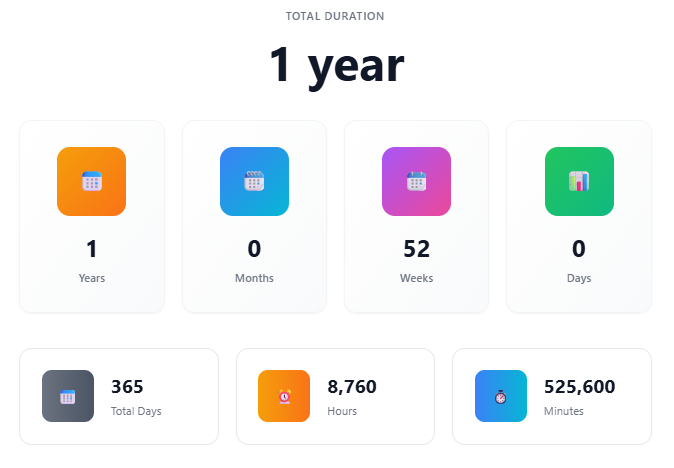
- Total duration in years, months, weeks, and days
- Total hours and minutes lived or passed
Simple example: From Monday, April 1, 2026 to Friday, April 5, 2026
- Total calendar days: 4 days
- Business days (Mon-Fri): 5 days? Wait, careful.
Let me clarify with a better example:
Start Date: Monday, April 1, 2026 End Date: Monday, April 8, 2026 (7 days later)
With Monday to Friday counting mode:
- Business days: April 1 (Mon), 2 (Tue), 3 (Wed), 4 (Thu), 5 (Fri), 8 (Mon) = 6 business days
- Weekend days: April 6 (Sat), 7 (Sun) = 2 weekend days
- Total calendar days: 8 days (including end date? No, difference is 7 days)
This is why you need a reliable calculator. Manual counting on a calendar is error-prone.
Why Most People Get Date Difference and Business Days Wrong
After reviewing countless project timelines and event schedules, I have seen these mistakes again and again.
Mistake 1: Not understanding inclusive vs exclusive counting
When someone says "in 5 business days," do they count today as day 1 or tomorrow? Different people mean different things. Our calculator counts the actual difference between dates, not including the start date.
Mistake 2: Forgetting that different countries have different weekends
Most of the world uses Monday to Friday as working days with Saturday and Sunday off. But some countries (like many in the Middle East) work Sunday to Thursday with Friday and Saturday off. Some businesses work Monday to Saturday with only Sunday off.
Mistake 3: Ignoring public holidays
A business days calculator that does not account for public holidays will always be slightly off. Our calculator can be adapted for holidays, though we recommend checking specific holiday calendars for your country.
Mistake 4: Confusing total days with working days
A 30-day project that includes 8 weekend days is actually only 22 working days. If you planned for 30 working days, you need a 38-day calendar timeline.
Mistake 5: Not calculating hours and minutes for deadlines
For exact deadlines, total minutes matter. A project due at 5 PM on Friday is very different from one due at 9 AM on Monday. Our calculator shows total hours and minutes between exact times.
Mistake 6: Manual date math errors
Try calculating the difference between December 25, 2025 and January 10, 2026 in your head. You have to account for crossing a year boundary and different month lengths. Most people get it wrong.
How to Calculate Date Difference and Business Days Manually – Step by Step
Let me show you how to calculate everything manually. Then you can use our tool to verify your answers.
Step 1: Identify your dates
Example:
- Start Date: March 15, 2026
- End Date: April 20, 2026
- Your work week: Monday to Friday (excluding Saturday and Sunday)
Step 2: Calculate total calendar days
Formula for total days between two dates:
Total Days = (End Date - Start Date) in milliseconds ÷ (1000 × 60 × 60 × 24)
From March 15 to April 20, 2026:
- Remaining days in March: 16 days (March 16 to March 31)
- Days in April until the 20th: 20 days
- Total calendar days: 16 + 20 = 36 days
Step 3: Calculate business days (Monday to Friday)
Formula for business days counting:
Business Days = Total Days – Number of Saturdays – Number of Sundays (or count weekdays directly)
Manual counting method:
March 2026:
- March 15 (Sun) - Weekend, not counted
- March 16 (Mon) - Business day 1
- March 17 (Tue) - Business day 2
- March 18 (Wed) - Business day 3
- March 19 (Thu) - Business day 4
- March 20 (Fri) - Business day 5
- March 21 (Sat) - Weekend
- March 22 (Sun) - Weekend
- March 23 (Mon) - Business day 6
- March 24 (Tue) - Business day 7
- March 25 (Wed) - Business day 8
- March 26 (Thu) - Business day 9
- March 27 (Fri) - Business day 10
- March 28 (Sat) - Weekend
- March 29 (Sun) - Weekend
- March 30 (Mon) - Business day 11
- March 31 (Tue) - Business day 12
April 2026:
- April 1 (Wed) - Business day 13
- April 2 (Thu) - Business day 14
- April 3 (Fri) - Business day 15
- April 4 (Sat) - Weekend
- April 5 (Sun) - Weekend
- April 6 (Mon) - Business day 16
- April 7 (Tue) - Business day 17
- April 8 (Wed) - Business day 18
- April 9 (Thu) - Business day 19
- April 10 (Fri) - Business day 20
- April 11 (Sat) - Weekend
- April 12 (Sun) - Weekend
- April 13 (Mon) - Business day 21
- April 14 (Tue) - Business day 22
- April 15 (Wed) - Business day 23
- April 16 (Thu) - Business day 24
- April 17 (Fri) - Business day 25
- April 18 (Sat) - Weekend
- April 19 (Sun) - Weekend
- April 20 (Mon) - Business day 26
Result: 36 total days, 26 business days, 10 weekend days
Step 4: Calculate years, months, and weeks
Formula for years and months:
Years = End Year – Start Year Months = End Month – Start Month Days = End Day – Start Day
Adjustment rules:
- If Days is negative, borrow one month (add days of previous month)
- If Months is negative, borrow one year (add 12 months)
For our example (March 15 to April 20):
- Years = 2026 – 2026 = 0 years
- Months = April (4) – March (3) = 1 month
- Days = 20 – 15 = 5 days
- Final: 1 month, 5 days
Formula for weeks:
Weeks = Total Days ÷ 7 (whole number only) Remaining Days = Total Days – (Weeks × 7)
For our example: 36 ÷ 7 = 5 weeks and 1 day
Step 5: Calculate total hours and minutes
Formula for hours:
Total Hours = Total Days × 24
Formula for minutes:
Total Minutes = Total Hours × 60
For our example:
- Total hours: 36 × 24 = 864 hours
- Total minutes: 864 × 60 = 51,840 minutes
For business hours only (8 hours per business day):
Business Hours = Business Days × 8
For our example: 26 × 8 = 208 working hours
Step 6: Calculate weekend days
Formula:
Weekend Days = Total Days – Business Days
For our example: 36 – 26 = 10 weekend days
Final manual answer:
- Total duration: 1 month, 5 days
- Total calendar days: 36
- Business days (Mon-Fri): 26
- Weekend days: 10
- Total hours: 864
- Total minutes: 51,840
- Business hours (8-hour days): 208
The easier way: Our date difference calculator gives you all of this instantly. No manual counting. No errors.
Date Difference Calculator for Different Scenarios
Business Days Calculator for Project Management
This is the most common use. You need to know exactly how many working days are available for a project.
Scenario: Your team can work Monday to Friday. You have a project starting May 1, 2026 and ending June 15, 2026.
Our calculator shows:
- Total duration: 1 month, 14 days
- Total calendar days: 45
- Business days (Mon-Fri): 33
- Weekend days: 12
Why this matters: If each task takes 1 business day, you have 33 available task slots, not 45. Plan accordingly.
Working Days Calculator for Delivery Estimates
E-commerce businesses need accurate delivery estimates that exclude weekends.
Scenario: Customer orders on Friday, December 4, 2026. Your shipping policy says "delivery in 3 business days."
Our calculator (Mon-Fri mode):
- Day 1 (Business day): Monday, December 7
- Day 2 (Business day): Tuesday, December 8
- Day 3 (Business day): Wednesday, December 9
Delivery estimate: Wednesday, December 9
Date Duration Calculator for Event Planning
Planning an event? You need exact duration for booking venues, catering, and staff.
Scenario: Wedding from July 10 to July 25, 2026
Our calculator shows:
- Total days: 15 days
- Weekends included: 2 full weekends (4 weekend days)
- Business days for vendors: 11 days
Use case: Caterers need to know how many days they are serving. Venue needs total booking duration. Staff needs work schedule.
Work Schedule Calculator for Employee Planning
HR departments need to calculate work days for payroll, leave requests, and attendance.
Scenario: Employee takes leave from August 5 to August 20, 2026. How many working days are they absent?
Our calculator (Mon-Fri mode):
- Business days absent: 12 days
- Weekend days within leave: 4 days
- Total calendar days absent: 16 days
Important for payroll: The employee should be paid for weekend days (if salaried) but not charged leave for them if weekends are non-working days.
Weekday Calculator for School Planning
Schools need to count instructional days excluding weekends and holidays.
Scenario: School term from September 1 to December 15, 2026
Our calculator shows:
- Total calendar days: 105 days
- Weekdays (Mon-Fri): 75 days
- Weekends: 30 days
Further adjustment: Subtract public holidays to get actual instructional days.
Deadline Calculator with Weekends
Legal deadlines, contract dates, and payment due dates often exclude weekends.
Scenario: Invoice due "10 business days from March 20, 2026."
Our calculation:
- March 21, 22 (weekend) - excluded
- March 23 (Mon) - Day 1
- March 24 (Tue) - Day 2
- March 25 (Wed) - Day 3
- March 26 (Thu) - Day 4
- March 27 (Fri) - Day 5
- March 28, 29 (weekend) - excluded
- March 30 (Mon) - Day 6
- March 31 (Tue) - Day 7
- April 1 (Wed) - Day 8
- April 2 (Thu) - Day 9
- April 3 (Fri) - Day 10
Due date: Friday, April 3, 2026
How to Calculate Date Difference – The Formula
Here are the mathematical formulas used for accurate date difference calculation.
Formula 1: Total Days Between Two Dates
Total Days = (End Date – Start Date) in milliseconds ÷ 86,400,000
(86,400,000 is the number of milliseconds in one day: 1000 × 60 × 60 × 24)
Example: If the difference in milliseconds is 3,110,400,000 → 3,110,400,000 ÷ 86,400,000 = 36 days
Formula 2: Total Hours and Minutes
Total Hours = Total Days × 24 Total Minutes = Total Hours × 60
Example: 36 days × 24 = 864 hours → 864 × 60 = 51,840 minutes
Formula 3: Years, Months, and Days Breakdown
Years Difference = End Year – Start Year Months Difference = End Month – Start Month
Days Difference = End Day – Start Day
Adjustment Rules:
Rule A (Borrow days): If Days Difference is negative, subtract 1 from Months Difference and add the number of days in the previous month to Days Difference.
Rule B (Borrow months): If Months Difference is negative, subtract 1 from Years Difference and add 12 to Months Difference.
Example (March 15 to April 20):
- Years: 2026 – 2026 = 0
- Months: 4 – 3 = 1
- Days: 20 – 15 = 5
- Result: 0 years, 1 month, 5 days
Formula 4: Weeks and Remaining Days
Weeks = Total Days ÷ 7 (take only the whole number) Remaining Days = Total Days – (Weeks × 7)
Example: 36 ÷ 7 = 5 weeks and 1 day (since 5 × 7 = 35, and 36 – 35 = 1)
Formula 5: Business Days (Monday to Friday)
Method 1 – Direct counting: Count all days from start date to end date that are Monday, Tuesday, Wednesday, Thursday, or Friday. Exclude all Saturdays and Sundays.
Method 2 – Formula approach:
Business Days = Total Days – (Number of Saturdays) – (Number of Sundays)
Example: 36 total days – 5 Saturdays – 5 Sundays = 26 business days
Formula 6: Business Days (Monday to Saturday)
Business Days (with Saturday) = Total Days – (Number of Sundays only)
Example: 36 total days – 5 Sundays = 31 business days (including Saturdays)
Formula 7: Weekend Days
Weekend Days = Total Days – Business Days
Example (Mon-Fri): 36 – 26 = 10 weekend days
Formula 8: Business Hours (at 8 hours per day)
Business Hours = Business Days × 8
Example: 26 business days × 8 = 208 working hours
Formula 9: Percentage of Working Time
Working Time Percentage = (Business Days ÷ Total Days) × 100
Example: (26 ÷ 36) × 100 = 72.2% working days
You do not need to remember any of these formulas. Our business days calculator handles all the math automatically.
Business Days vs Calendar Days – What's the Difference?
This is the most important concept to understand.
Calendar Days: Every day of the week, including Saturdays and Sundays.
- 7 days in a calendar week
- 365 days in a calendar year (366 in leap year)
Business Days (Working Days): Only the days you work.
- Monday to Friday: 5 business days per week
- Monday to Saturday: 6 business days per week
Real-world example:
A "5 business day" delivery promise starting Friday:
If counting business days only (Mon-Fri):
- Friday (order day) - often not counted as day 1
- Monday = Day 1
- Tuesday = Day 2
- Wednesday = Day 3
- Thursday = Day 4
- Friday = Day 5
Delivery on Friday (not Tuesday, which would be only 3 business days later)
This is why you need a calculator. Business day counting conventions vary between companies.
Common Questions About Date Difference and Business Days
Q: How do I calculate business days between two dates?
A: Count all days from start date to end date that are Monday through Friday (or Monday through Saturday, depending on your work week). Exclude Sundays in the "with Saturday" mode, or exclude both Saturdays and Sundays in the "Monday to Friday" mode.
Q: What is the difference between "with Saturday" and "without Saturday" modes?
A: "With Saturday" mode (Monday to Saturday) counts Saturdays as business days and only excludes Sundays. "Without Saturday" mode (Monday to Friday) excludes both Saturdays and Sundays. Choose based on your business's work week.
Q: Does the calculator include the start date or end date?
A: Our calculator shows the duration between dates, not including the start date. For example, from Monday to Tuesday is 1 day difference, not 2 days.
Q: How do I calculate total working hours from business days?
A: Multiply the number of business days by your standard workday hours. Most businesses use 8 hours per day. Example: 22 business days × 8 hours = 176 working hours.
Q: Can this calculator account for public holidays?
A: Our current version counts weekends only. For public holidays, we recommend manually subtracting holiday days from the business days count based on your country's holiday calendar.
Q: How accurate is the date difference calculator?
A: 100% accurate for date math. It accounts for leap years, different month lengths, and year boundaries correctly.
Q: Can I calculate date difference for future dates?
A: Yes. Enter any start date and end date, past or future. The calculator works for all dates.
Q: How do I count business days excluding both Saturdays and Sundays?
A: Select the "Monday to Friday" counting mode in our calculator. It automatically excludes both weekend days.
Q: How many business days are in a year?
A: In a typical year with Monday-Friday work week: 260-262 business days. In a Monday-Saturday work week: 313-314 business days.
Practical Uses of Business Days Calculator in Daily Life
For Project Managers
- Calculate exact project duration in working days
- Set realistic deadlines excluding weekends
- Track team capacity and workload
- Plan sprint cycles (e.g., 10 business day sprints)
- Estimate completion dates accurately
For Business Owners
- Set customer delivery expectations correctly
- Calculate employee leave balances in working days
- Plan inventory arrival based on shipping business days
- Schedule meetings and events without weekend surprises
- Manage payroll for hourly workers
For Event Planners
- Calculate setup and teardown duration
- Schedule vendor deliveries on business days only
- Plan wedding or conference timelines
- Coordinate with venues on booking duration
- Manage staff schedules
For Legal and Financial Professionals
- Calculate contract deadlines excluding weekends
- Determine payment due dates
- Count legal filing periods
- Calculate interest accrual periods
- Track statutory notice periods
How to Use Business Days Calculator for Project Planning
After years of project management experience, here is my recommended workflow:
Step 1: Define your work week Are you working Monday to Friday (5 days) or Monday to Saturday (6 days)? Be clear before calculating.
Step 2: Account for public holidays Subtract any holidays that fall within your business days range.
Step 3: Add buffer days Never plan to use 100% of available business days. Add 15-20% buffer for unexpected delays.
Step 4: Calculate total calendar duration Once you know your required business days, use the calculator to find the calendar end date.
Step 5: Communicate clearly When telling clients or stakeholders, specify whether you mean business days or calendar days.
Example project plan:
- Required work: 22 business days
- Work week: Monday to Friday
- Public holidays in period: 1 day
- Business days needed: 23 (including buffer)
- Calendar days needed: Approximately 32 days
- Project end date: 32 calendar days from start
Tips for Accurate Date Difference Calculation
Tip 1: Use the same calendar for both dates Date calculations crossing month or year boundaries need careful attention. Our calculator handles this automatically.
Tip 2: Be consistent with start dates Decide whether "Day 1" is the start date or the day after. For project planning, most people count the first full day after starting.
Tip 3: Account for partial days If you start at 2 PM on Monday, the first day is only 6 working hours, not 8. Our calculator assumes full days.
Tip 4: Check for leap years Leap years add February 29. Our calculator handles this automatically.
Tip 5: Verify for long durations For spans over multiple years, manually verify with known dates to ensure your calculation method is correct.
My Final Advice
After helping thousands of people calculate date differences and business days for projects, deliveries, and legal deadlines, here is what I have learned:
Always clarify what "business days" means to your specific situation. Different companies, countries, and industries have different definitions. Do not assume everyone uses Monday to Friday.
Use calendar days for long-term planning and business days for task-level scheduling. Mixing them up leads to timeline errors.
Never rely on mental math for date differences spanning more than 2 weeks. The human brain is terrible at counting days across month boundaries.
Check your calculations with a reliable tool for important deadlines. For legal documents, large projects, or expensive deliveries, use our date difference calculator to be absolutely certain.
Build in buffer time. If you calculate exactly 20 business days, add 2-3 extra days for unexpected delays. This habit has saved me countless times.
And finally, remember that time is your most valuable resource. Understanding exactly how many days, hours, and minutes you have between dates helps you plan better, work smarter, and stress less.
Calculate Your Date Difference Now – Free Tool
Have questions about date difference calculation for a specific project or scenario? Leave a comment below. I read every one.
Tags: business days calculator, date difference calculator, working days calculator, business day counter, calculate business days between dates, exclude weekends from date calculation, project timeline calculator, date duration calculator, work days between two dates, count business days online, mon to fri calculator, weekday calculator, exclude sundays calculator, business days vs calendar days, project planning date calculator, deadline calculator with weekends, work schedule date tool, accurate date difference tool