Time Calculator – Complete Guide to Calculate Date and Time Differences
Have you ever needed to know what date it will be 45 days from today for a project deadline? Or maybe you needed to calculate what date it was 3 months ago for a billing cycle?
I remember planning a major project at work. The client asked, "When will you deliver if we give you 60 days from the start date?" I stood there trying to count days on a calendar. Was it 60 calendar days or business days? What about weekends? I was not sure. I ended up guessing, and I was wrong. The deadline was missed because I miscalculated.
After that experience, I learned how to calculate dates accurately. Now I can add or subtract days, weeks, months, and years from any date with confidence. This guide will teach you everything you need to know about date and time calculations.
Quick access: Use our free time calculator here
What is a Time Calculator? Simple Answer
A time calculator is a tool that helps you add or subtract time from a specific date. You give it a starting date, tell it how much time to add or subtract (like 10 days or 3 months), and it tells you the resulting date.
Simple examples:
- Today is October 16, 2025. Add 10 days → October 26, 2025
- Today is October 16, 2025. Subtract 3 months → July 16, 2025
- Today is October 16, 2025, at 2:30 PM. Add 90 minutes → October 16, 2025, at 4:00 PM
This is different from a time difference calculator (which tells you how much time is between two dates). A time calculator modifies a single date by adding or subtracting time.
Why Use a Time Calculator?
Date and time calculations are needed in many situations.
For project management:
- Calculate delivery dates based on start date
- Determine milestone dates from project kickoff
- Find when resources will be available
- Schedule review meetings
For event planning:
- Calculate RSVP deadlines from invitation date
- Determine when to send reminders
- Find the date for follow-up events
- Plan wedding or party dates
For finance and billing:
- Calculate due dates for invoices (30 days, 60 days, 90 days)
- Determine payment due dates from billing date
- Calculate subscription renewal dates
- Find loan payment dates
For travel planning:
- Calculate return dates from departure date
- Determine visa expiration dates
- Find when to book flights
- Plan itinerary dates
For legal and compliance:
- Calculate contract expiration dates
- Determine notice period dates
- Find filing deadline dates
- Calculate statute of limitation dates
For personal use:
- Calculate birthday or anniversary countdowns
- Determine when to start vacation planning
- Find medication refill dates
- Calculate fitness goal dates
How to Calculate Dates Manually
Understanding manual date calculation helps you verify results and understand how the tool works.
Adding Days to a Date
Example: Add 45 days to October 16, 2025
Step 1: Start with October 16, 2025
Step 2: Days remaining in October: 31 - 16 = 15 days
Step 3: 45 - 15 = 30 days remaining
Step 4: November has 30 days → 30 days covers all of November
Result: December 1, 2025
Subtracting Days from a Date
Example: Subtract 45 days from October 16, 2025
Step 1: Start with October 16, 2025
Step 2: Subtract 16 days to reach October 1, 2025 → 45 - 16 = 29 days remaining
Step 3: September has 30 days → subtract 29 days from September 30
Result: September 1, 2025
Adding Months to a Date
Example: Add 3 months to October 16, 2025
Step 1: October + 3 months = January
Step 2: Day stays 16
Result: January 16, 2026
Important: Adding months to January 31 gives February 28 (or 29 in leap years), not February 31 (which does not exist).
Adding Years to a Date
Example: Add 5 years to October 16, 2025
Step 1: Add 5 to the year
Result: October 16, 2030
Leap year consideration: Adding years to February 29 works differently. 2024 is a leap year (February 29 exists). Adding 1 year to February 29, 2024 gives February 28, 2025 (since 2025 is not a leap year).
Time Units and Conversions
Understanding time unit conversions helps you work with different units.
Time Unit Conversion Table
| From Unit | To Unit | Conversion |
|---|---|---|
| 1 minute | seconds | 60 seconds |
| 1 hour | minutes | 60 minutes |
| 1 hour | seconds | 3,600 seconds |
| 1 day | hours | 24 hours |
| 1 day | minutes | 1,440 minutes |
| 1 day | seconds | 86,400 seconds |
| 1 week | days | 7 days |
| 1 week | hours | 168 hours |
| 1 month | days | 28-31 days (varies) |
| 1 year | days | 365 days (366 for leap year) |
| 1 year | weeks | 52.14 weeks |
Common Time Amounts Reference
| Time Period | Days | Hours | Minutes |
|---|---|---|---|
| 1 week | 7 days | 168 hours | 10,080 minutes |
| 2 weeks | 14 days | 336 hours | 20,160 minutes |
| 30 days | 30 days | 720 hours | 43,200 minutes |
| 90 days | 90 days | 2,160 hours | 129,600 minutes |
| 6 months | ~182.5 days | ~4,380 hours | ~262,800 minutes |
| 1 year | 365 days | 8,760 hours | 525,600 minutes |
How to Use Our Time Calculator
Our time calculator tool makes date and time calculations instant.
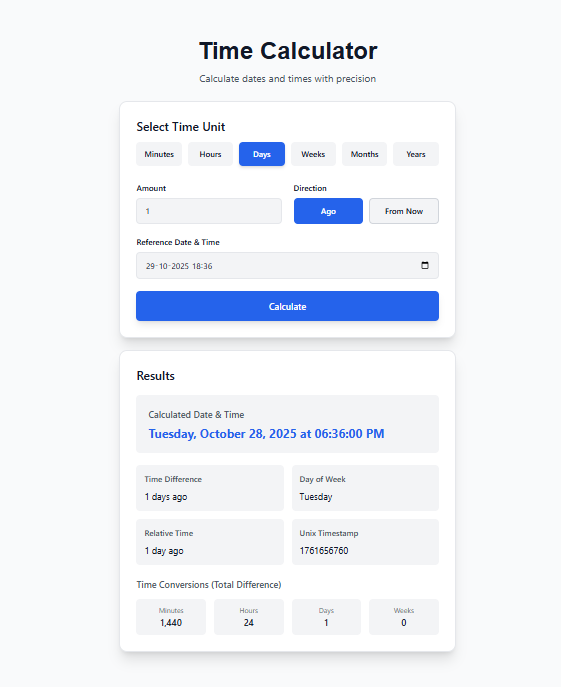
Step 1: Select the time unit you want to add or subtract:
- Minutes
- Hours
- Days
- Weeks
- Months
- Years
Step 2: Enter the amount (e.g., 5, 10, 30, 100)
Step 3: Select the direction:
- From Now (future date)
- Ago (past date)
Step 4: Set the reference date and time (defaults to current date and time)
Step 5: Click Calculate
You will see:
- Calculated date and time (the result)
- Day of the week for the result
- Relative time phrase (e.g., "10 days from now")
- Unix timestamp (for developers)
- Total minutes, hours, days, and weeks difference
All calculations happen in your browser. Your data never leaves your device.
Real-Life Examples of Time Calculations
Example 1: Project Deadline
Scenario: A project starts on November 1, 2025. The client gives 60 days for completion. What is the deadline?
Calculation:
- Start date: November 1, 2025
- Add 60 days
- November has 30 days → 60 - 30 = 30 days remaining
- December 1, 2025 + 30 days = December 31, 2025
Answer: Deadline is December 31, 2025
Example 2: Invoice Due Date
Scenario: An invoice is issued on October 16, 2025. Payment is due in 30 days.
Calculation:
- Start date: October 16, 2025
- Add 30 days
- October has 31 days → 31 - 16 = 15 days in October
- 30 - 15 = 15 days remaining
- November 15, 2025
Answer: Due date is November 15, 2025
Example 3: Subscription Renewal
Scenario: A yearly subscription started on March 15, 2025. When does it renew?
Calculation:
- Start date: March 15, 2025
- Add 1 year
- Result: March 15, 2026
Answer: Renewal date is March 15, 2026
Example 4: Medication Refill
Scenario: A 90-day medication supply starts on October 16, 2025. When should you refill?
Calculation:
- Start date: October 16, 2025
- Add 90 days
- October: 31 - 16 = 15 days → 90 - 15 = 75 days remaining
- November: 30 days → 75 - 30 = 45 days remaining
- December: 31 days → 45 - 31 = 14 days remaining
- January 14, 2026
Answer: Refill by January 14, 2026
Example 5: Return Date for Travel
Scenario: You depart on December 20, 2025, for a 14-day trip. When do you return?
Calculation:
- Start date: December 20, 2025
- Add 14 days
- December 20 + 14 = January 3, 2026
Answer: Return date is January 3, 2026
Example 6: Past Date Calculation
Scenario: A contract was signed 90 days ago. What was the signing date? (Today: October 16, 2025)
Calculation:
- Today: October 16, 2025
- Subtract 90 days
- October: 16 days to October 1 → 90 - 16 = 74 days remaining
- September: 30 days → 74 - 30 = 44 days remaining
- August: 31 days → 44 - 31 = 13 days remaining
- July 18, 2025 (since July has 31 days, 31 - 13 = 18)
Answer: Contract signed on July 18, 2025
Adding and Subtracting Different Time Units
Adding Minutes and Hours
When adding minutes or hours, the date may change if the time crosses midnight.
Example: October 16, 2025, at 11:00 PM + 2 hours = October 17, 2025, at 1:00 AM
Adding Days
Adding days is straightforward. The tool automatically handles month boundaries and year boundaries.
Example: December 30, 2025 + 5 days = January 4, 2026
Adding Weeks
Adding weeks is equivalent to adding 7 days per week.
Example: October 16, 2025 + 3 weeks = October 16 + 21 days = November 6, 2025
Adding Months
Adding months keeps the same day number, but if that day does not exist in the target month, it adjusts to the last day of the month.
Examples:
- January 31 + 1 month = February 28 (or 29 in leap year)
- March 31 + 1 month = April 30
- April 30 + 1 month = May 30
Adding Years
Adding years keeps the same month and day, but February 29 in leap years is an exception.
Examples:
- October 16, 2025 + 1 year = October 16, 2026
- February 29, 2024 + 1 year = February 28, 2025
Leap Year Considerations
Leap years add an extra day (February 29) every 4 years, except for century years not divisible by 400.
Leap Year Rules
- Divisible by 4 → Leap year
- Divisible by 100 → Not a leap year (unless also divisible by 400)
- Divisible by 400 → Leap year
Leap year examples:
- 2024: Divisible by 4 → Leap year (February 29 exists)
- 2025: Not divisible by 4 → Not leap year
- 2100: Divisible by 100 but not 400 → Not leap year
- 2000: Divisible by 400 → Leap year
How Leap Years Affect Calculations
Adding 1 year to February 29, 2024:
- 2025 is not a leap year, so result is February 28, 2025
Adding 4 years to February 29, 2024:
- 2028 is a leap year, so result is February 29, 2028
Adding 365 days to a date in a leap year:
- The result may be off by 1 day compared to adding 1 year
Time Calculator vs Date Difference Calculator
These two tools serve different purposes. Do not confuse them.
| Feature | Time Calculator | Date Difference Calculator |
|---|---|---|
| What it does | Adds/subtracts time to/from one date | Calculates time between two dates |
| Input | One date + time amount | Two dates |
| Output | One new date | Time duration (days, hours, etc.) |
| Use case | "What date is 90 days from now?" | "How many days between these dates?" |
| Example | Oct 16 + 30 days = Nov 15 | Oct 16 to Nov 15 = 30 days |
Our tool is a Time Calculator (adds/subtracts time). For date difference calculations, see our other tools.
Common Time Calculation Mistakes
Mistake 1: Forgetting About Month Lengths
Problem: Adding 1 month to January 31 expecting February 31
Solution: February has only 28 or 29 days. The result will be February 28 or 29.
Mistake 2: Ignoring Leap Years
Problem: Adding 1 year to February 29, 2024 expecting February 29, 2025
Solution: 2025 is not a leap year. The result is February 28, 2025.
Mistake 3: Confusing Calendar Days with Business Days
Problem: Adding 10 days to a date expecting 10 business days (excluding weekends)
Solution: Business day calculations exclude weekends. Our tool calculates calendar days. For business days, you would need a separate tool.
Mistake 4: Off-by-One Errors
Problem: Adding 30 days to October 1 and thinking the result is October 30 (it is October 31)
Solution: October 1 + 30 days = October 31 (because Oct 1 + 1 = Oct 2, so 30 days later is Oct 31)
Mistake 5: Not Accounting for Time of Day
Problem: Adding 24 hours to 10:00 AM expecting 10:00 AM next day (correct). But adding 1 day to 10:00 PM expecting 10:00 PM next day (correct). No issue here, but be aware that adding 24 hours and adding 1 day are the same.
Practical Applications by Profession
For Project Managers
- Calculate milestone dates from project start
- Determine buffer dates for risk management
- Find when resources will be available
- Schedule review meetings
Common calculations:
- Start date + 30 days = milestone 1
- Start date + 60 days = milestone 2
- Start date + 90 days = project completion
For Finance Professionals
- Calculate invoice due dates (Net 30, Net 60, Net 90)
- Determine payment processing dates
- Find subscription renewal dates
- Calculate loan amortization dates
Common calculations:
- Invoice date + 30 days = due date
- Billing date + 1 month = next billing date
- Start date + 12 months = annual renewal
For Event Planners
- Calculate RSVP deadlines
- Determine when to send invitations
- Find follow-up event dates
- Plan rehearsal dates
Common calculations:
- Event date - 60 days = send invitations
- Event date - 30 days = RSVP deadline
- Event date - 7 days = final confirmation
For Legal Professionals
- Calculate contract expiration dates
- Determine notice period dates
- Find filing deadlines
- Calculate statute of limitation dates
Common calculations:
- Contract start + 365 days = expiration
- Notice date + 30 days = effective date
- Incident date + 2 years = statute deadline
For Healthcare Professionals
- Calculate medication refill dates
- Determine follow-up appointment dates
- Find vaccination schedule dates
- Calculate treatment plan milestones
Common calculations:
- Prescription date + 30 days = refill date
- Surgery date + 14 days = follow-up
- First dose + 21 days = second dose
Frequently Asked Questions
Q: How to calculate a date 30 days from today?
A: Use our time calculator. Select today as the reference date, enter 30 days, select "From Now", and click Calculate.
Q: How to calculate a date 90 days from today?
A: Same process as above, but enter 90 days. Our tool gives you the exact date.
Q: How to calculate what date was 60 days ago?
A: Select today as the reference date, enter 60 days, select "Ago", and click Calculate.
Q: How to add months to a date?
A: Select "Months" as the unit, enter the number of months, and select "From Now". The tool handles month length differences automatically.
Q: What happens when I add 1 month to January 31?
A: Since February has only 28 or 29 days, the result is February 28 (or 29 in leap years). The tool handles this automatically.
Q: How does the tool handle leap years?
A: The tool uses the system date functions, which correctly account for leap years. Adding 1 year to February 29, 2024 gives February 28, 2025.
Q: Can I calculate time including hours and minutes?
A: Yes. Set the reference time (hours and minutes) and add or subtract minutes or hours. The tool handles day changes if you cross midnight.
Q: What is the difference between adding 1 day and adding 24 hours?
A: For most purposes, they are the same. Adding 1 day keeps the same time of day. Adding 24 hours also keeps the same time of day.
Q: Does the tool account for Daylight Saving Time?
A: Yes. The tool uses your system's timezone settings, which include DST adjustments. Adding 24 hours will account for DST changes.
Q: What is a Unix timestamp?
A: A Unix timestamp is the number of seconds since January 1, 1970, UTC. It is commonly used in programming and databases.
Q: Can I calculate business days (excluding weekends)?
A: Our current tool calculates calendar days. For business day calculations, add only weekdays (Monday-Friday).
Q: Is the time calculator accurate for years?
A: Yes. The tool correctly handles leap years and month lengths when adding or subtracting years.
Q: Can I use the tool offline?
A: Once the page is loaded, all calculations happen in your browser. You can use it without an internet connection.
Q: Does the tool save my calculations?
A: No. All calculations are done locally in your browser. Nothing is saved or sent to any server.
Q: Is the time calculator free?
A: Yes. Completely free. No signup. No limits.
My Final Advice
After years of calculating dates for projects, events, and personal planning, here is what I have learned.
Always double-check month boundaries. Adding 30 days from October 1 gives October 31, not October 30. Count carefully.
Remember leap years when adding years to February 29. Adding 1 year to a leap day gives February 28 of the next year.
Use a calculator for important deadlines. Manual counting on a calendar is error-prone. A single off-by-one error can cause missed deadlines.
Consider business days vs calendar days. If a contract says "30 days", it usually means calendar days. If it says "30 business days", weekends are excluded.
Test with known dates first. Before trusting a tool for critical calculations, test it with dates you already know (like your birthday).
Add time of day when needed. For time-sensitive calculations (like medication schedules or flight times), include the time of day, not just the date.
And finally, use a good time calculator. Our tool handles all units, leap years, month lengths, and time of day. It is free and works anywhere.
Calculate Dates and Times Now – Free Tool
Have questions about time calculations for a specific use case? Leave a comment below. I try to answer every one.
Tags: time calculator, how to calculate time difference, date calculator, add time to date, subtract time from date, add days to date, subtract days from date, add weeks to date, add months to date, add years to date, date arithmetic calculator, calculate future date, calculate past date, time conversion calculator, minutes to hours converter, days to weeks converter, months to years converter, time difference in minutes, time difference in hours, time difference in days, time difference in weeks, unix timestamp calculator, project deadline calculator, event planning calculator, payroll date calculator, travel date calculator, date time calculator online free, calculate date after days, calculate date before days